
Appearance
AdminCollapsible definitions
Turn any word or phrase in your text into a link that reveals an explanation underneath it. Readers see a short, clean sentence; anyone who needs the detail clicks the word to expand it.
This is useful when a sentence contains a term that some readers know and others don't — a piece of jargon, a legal definition, or a list of examples. Instead of interrupting everyone with a long parenthetical, you tuck the detail behind the word.
Where you can use it
The Collapsible definition tool appears in the rich-text toolbar on:
- Step descriptions — Programs → Manage Definition → click a step → Step Description
- Form content — the content body of a form built with the form builder
- Competency paths, groups and competencies — Competencies → Competency Paths → open a path. Every rich-text field there offers the tool: the path description, each group's description and Additional Information, and each competency's name, description, additional information and suggested-goals text. The same fields in the Add/Edit Group modal offer it too.
Definitions written on a competency path show up wherever that text is rendered — the member's rating form, the reviewer's view, the read-only submission view, and the PDF export.
Add a definition
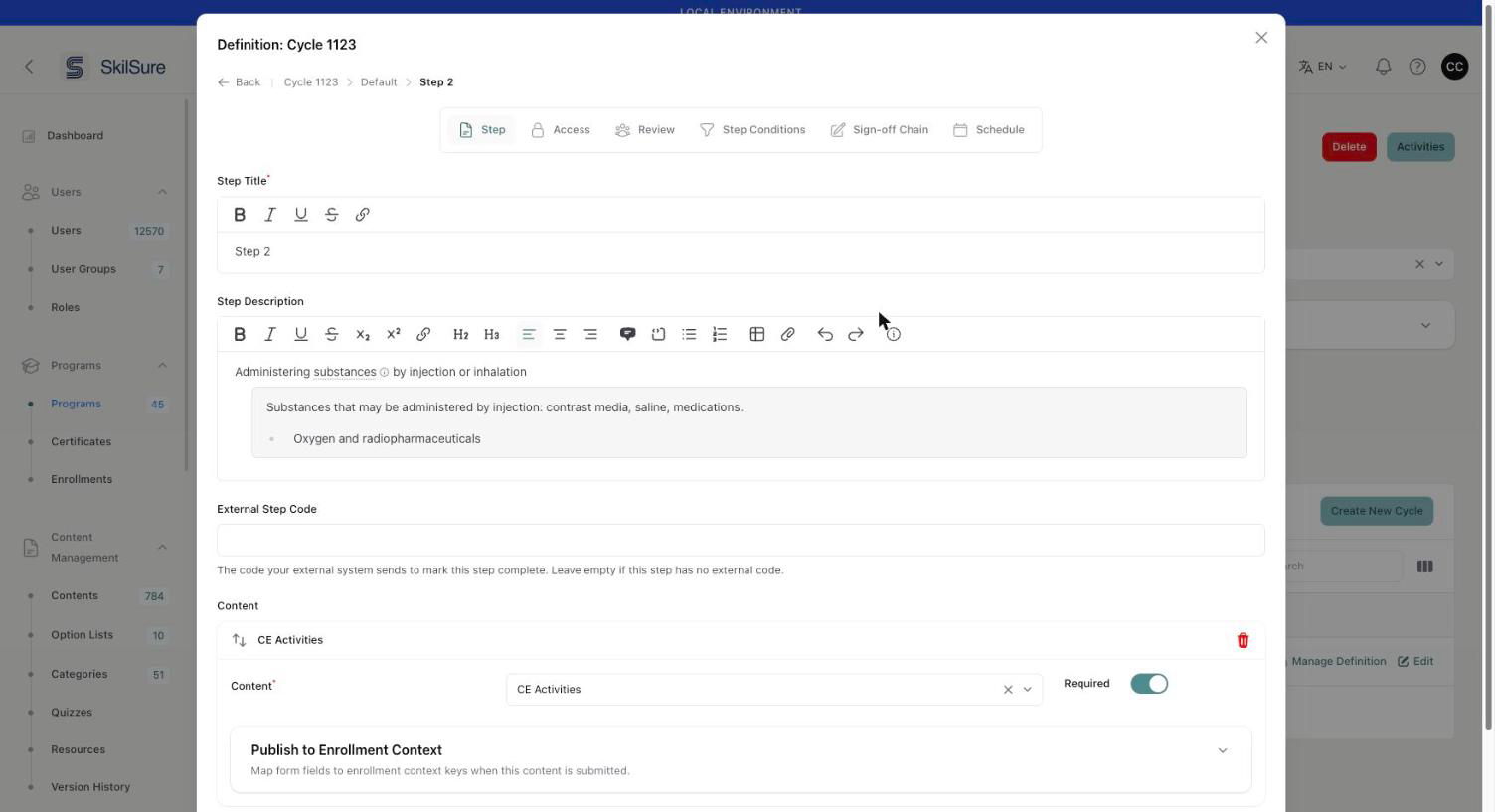 Step 2 → Step Description. The word "substances" is the trigger; the shaded block underneath is its definition panel, edited in place like any other content.
- Select the word or phrase you want readers to click.
- Click the ⓘ button at the right-hand end of the toolbar.
- An empty panel appears below the paragraph, with your cursor already in it. Type the definition.
The selected word picks up a dotted underline and a small ⓘ icon so readers can tell it opens something.
Defining a word inside a list
The panel is always placed after the whole block it belongs to. If you define a word inside a bulleted list or a quote, the panel appears below the entire list or quote rather than directly under that one item. Move the sentence out of the list if you need the definition to sit closer to it.
Write the definition
The panel is ordinary rich text, so you can use everything the editor offers — paragraphs, bold and italic, links to external pages, and bulleted or numbered lists. Format it exactly as you would any other content.
Keep them short
Definitions work best at a sentence or two. If you find yourself writing several paragraphs, that content probably belongs in the step description itself, or in a resource you link to.
Remove a definition
Put your cursor anywhere in the underlined word and click the ⓘ button again. The underline is removed and the panel is deleted with it.
What readers see
The definition starts collapsed. Readers click the underlined word to expand it, and click again to close it. See Complete a step for the reader's view.
Two behaviours worth knowing:
- Definitions are always expanded when a page is printed, so nothing is lost on a printed or saved copy.
- The dotted underline is deliberately different from the solid underline used by ordinary links, so readers can tell "this explains a word" apart from "this navigates somewhere else".
Translations
The definition is part of the text it sits in, so it is translated with the rest of that field. Add the definition again in each language you publish — switching locale in the editor and repeating the steps above.