
Appearance
AdminSSO cycle enrollment dates
When members sign in through an SSO connection, that connection can enroll them into a program cycle automatically. Program cycles are shared by everyone in them, so a cycle carries one start and one deadline for all members.
Some programs don't work that way. A member reinstating in April needs their own window running from April, not from the cycle's January start — even though they sit in the same cycle as everyone else. Enable Override Enrollment Start and Deadline Dates gives each member their own window, worked out from a date in their sign-in payload.
Reach the setting
Open Settings → Integrations, click Configure on your SSO connection, and scroll to Cycle Enrollments. Expand the enrollment row you want to change.
The setting appears on each enrollment row, directly under Resolver date offset (days).
A row can also close a member's open enrollments instead of enrolling them — see Close enrollments on SSO sign-in.
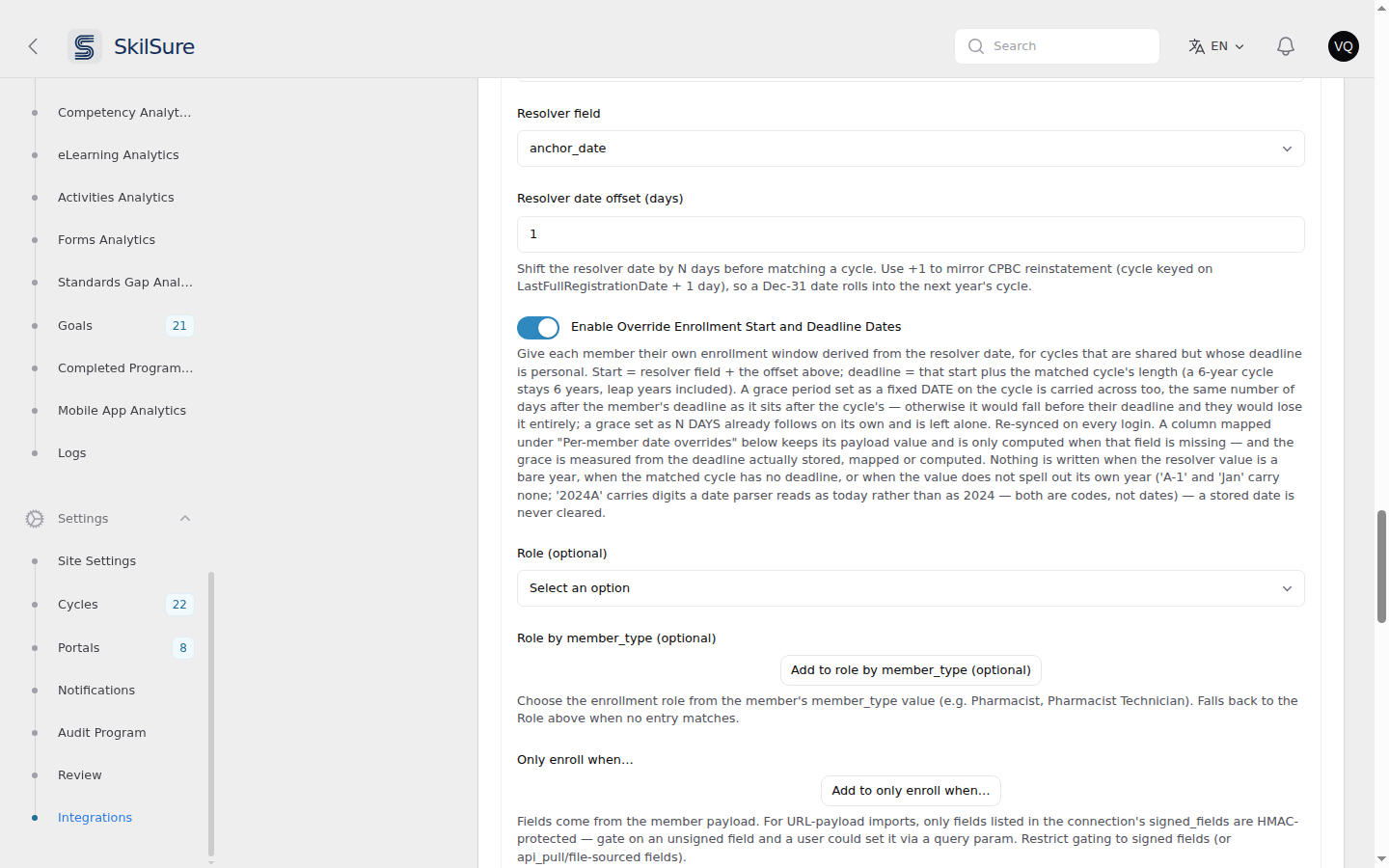 Settings → Integrations → Configure → Cycle Enrollments. The override switch sits under the resolver date offset, and is off until you turn it on.
Only on payload-driven rows
The switch appears only when Resolution strategy is Value-mapped from payload or Date-based from payload. A Fixed cycle row has no resolver date to work from, so the switch is hidden — and turning it on for another strategy has no effect after you switch that row to Fixed.
How the dates are worked out
Start date — the resolver field's value from the member's payload, plus Resolver date offset (days).
Deadline — that start date, plus the length of the cycle the member matched.
The deadline follows the matched cycle's length, so two rows on the same connection can produce different windows from the same sign-in:
| Matched cycle | Cycle length | Member start | Member deadline |
|---|---|---|---|
| 1 Jan 2026 – 31 Dec 2026 | 1 year | 10 May 2026 | 9 May 2027 |
| 2 Apr 2026 – 1 Jul 2026 | 3 months | 10 May 2026 | 9 Aug 2026 |
Length is measured in calendar terms, not in days, so a six-year cycle stays six years regardless of how many leap days fall inside it, and a window starting 29 February ends on 28 February.
Grace period — if the cycle grants a grace period as a fixed date, the member gets the same number of days of grace after their deadline as the cycle grants after its own. A cycle ending 31 December with grace to 31 January gives 31 days, so a member whose deadline is 31 March gets grace to 1 May.
A grace period set as N days after the deadline already follows each member's own deadline, so it is left alone.
The gap is measured from the deadline the member actually ends up with. If you map override_deadline_date from a payload field (below), that mapped deadline is what grace follows — not the calculated one.
Why grace has to move too
A fixed grace date belongs to the whole cycle. Left where it is, it would fall before the deadline of any member whose window was worked out later — and a grace date that precedes the deadline is discarded, so that member would end up with no grace at all while everyone else in the cycle kept theirs.
The dates are recalculated on every sign-in. If the source date in the member's payload changes, their window moves with it the next time they log in.
Recalculated on every sign-in
Because each login recalculates these dates, editing a member's override start or deadline by hand on their enrollment will be overwritten the next time they sign in. Change the date at the source instead.
The member's role
The same enrollment row carries Role and Role by member_type, which set the role on the member's enrollment — the role a program step checks on its Access tab.
Role by member_type picks the role from the member's member_type value in the payload. Role is the fallback used when the map has no entry for them.
A map match is re-applied on every sign-in, so a member the registrar reclassifies moves to their new role the next time they log in. The fallback Role is only used when the enrollment is first created — so a role you set by hand on an existing enrollment is not overwritten by it.
This is not the same as Portal Roles
A member has two separate roles, and this setting only sets one of them.
- Enrollment role — set here. Used by a step's Access tab to decide who does the work on that step.
- Portal Roles — on the user's own profile. Used to decide whether a member can open a role-restricted step at all.
Setting Role by member_type does not give the member a Portal Role. Portal Roles come from the member import instead — see Give imported users a role. If members report being locked out of their programs with Restricted Access, check their Portal Roles, not this setting.
When you already map dates from the payload
The same enrollment row has a Per-member date overrides table, which copies a date straight from a named payload field onto the enrollment.
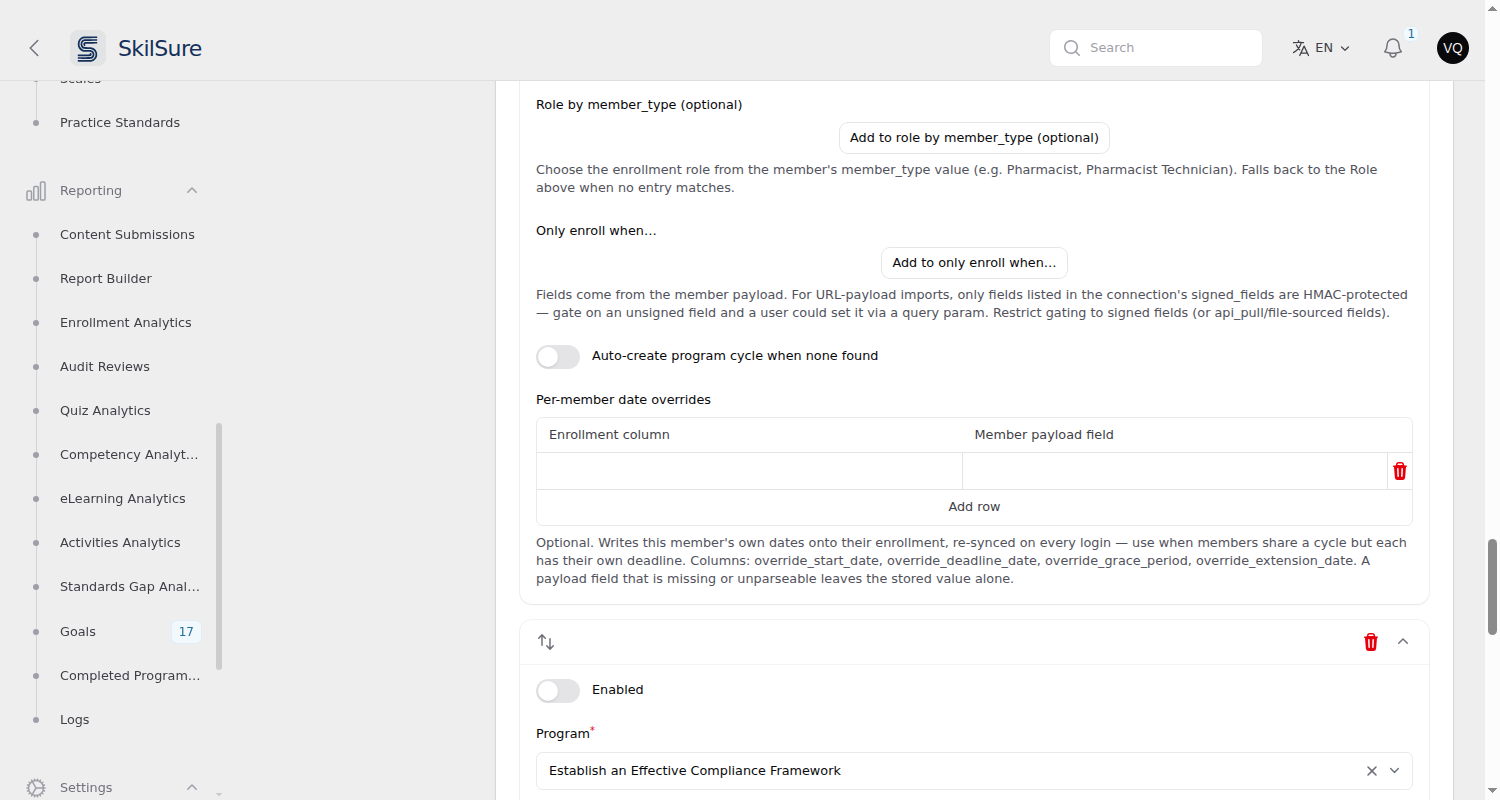 The same enrollment row, further down. Mapping a column here takes precedence over the calculated value.
The two work together, and the explicit mapping wins:
- A column you map here keeps the value from the payload field.
- A column you don't map is filled with the calculated value.
- A column you map whose payload field is missing or unreadable falls back to the calculated value.
So mapping only override_deadline_date gives you a payload-supplied deadline alongside a calculated start.
When nothing is written
Nothing is written, and any date already stored is left as it is, when:
- the resolver field is missing from the payload, or holds something that isn't a date
- the resolver field holds only a year (a year identifies a cycle, not a start date)
- the resolver field doesn't spell out its own year — a value like
A-1,T1orJancarries no year at all, and one like2024AorT1-2024carries digits a date parser happily reads as today rather than as 2024. Both are codes, not dates - the matched cycle's dates can't be read
No grace is worked out when the cycle grants none, or when the cycle's own grace does not fall after its deadline.
A stored date is never cleared by this setting.
Check what changed
Open Reporting → Logs → Integration Logs and find the member's sign-in. The cycle enrollment entry lists any dates that changed, and whether each came from a payload mapping or was calculated. It also records a change of enrollment role, showing the role moved from and to. A sign-in that changed nothing records neither, so a repeat login doesn't look like an edit.
Availability
Integrations may not be enabled for every tenant, and each SSO provider is enabled separately. If you don't see Integrations under Settings, or your provider isn't listed, it isn't enabled for yours.