
Appearance
AdminWhat's New
The highlights — the changes most likely to matter to you as an administrator, written in plain language.
October 2026
Download an enrollment report as a PDF
2026-10-16. Export Report on an enrollment's page now downloads a PDF of that enrollment: a summary of the user, program, cycle, status and dates, then every step with its status and dates. See Export an enrollment report.
See each scheduled member refresh run in Integration Logs
2026-10-15. Every Scheduled SSO Member Refresh run now writes one summary entry to Reporting → Logs → Integration Logs, under the new Scheduled member refresh type. It shows the run's outcome and how many users were refreshed or failed. Search run #<number> to list the member import and cycle enrollment entries that run wrote for each user. See Scheduled member refreshes.
Users are notified when you review their activity
2026-10-15. When you approve, reject, change the category of or edit a user's activity, the user now gets a bell notification with the outcome, your reason or comment, and a link to their Activities step. Bulk approve and bulk reject send each user one summary. To email users as well, turn on Email users when their CE activity is reviewed under Settings → Notifications → Settings. It is off by default. See How users are notified.
Review an activity on one page
2026-10-14. Each row in Activities Analytics now has a Review action that opens a Review Activity page. Its Staff Review panel lets you approve, reject (with a required reason) or change the category of an activity while you read the user's answers below. Roles with the new Edit a User's CE Activity permission can also correct the answers and save them. The activity keeps its status, and the edit is recorded in its Review History. The permission is granted to no role by default. Activities Analytics now opens on all statuses, and an Under Review status option lists the activities waiting for a decision. Your filters are kept when you return from the page. See Review activities.
Reviewers now see a member's form the way the member filled it in
2026-10-14. When an auditor, a supervisor or an administrator opens a member's form submission, it now looks like the member's own form, read-only. The headings, instructions, layout, sub-forms, signature, required markers and rating grids all appear in the form's own order, and uploaded files are download links under their original names. Before, the answers were a plain list of labels and values, in whatever order they happened to be stored, and rating grids were hard to read. This applies on the auditor's review page, the supervisor's sign-off page, the mentor's review, View Step Content and the Content Submissions report. Nothing can be changed from these views. Learning Portfolio goal answers still show as a list of labels and values, now in the form's order. See Program audits.
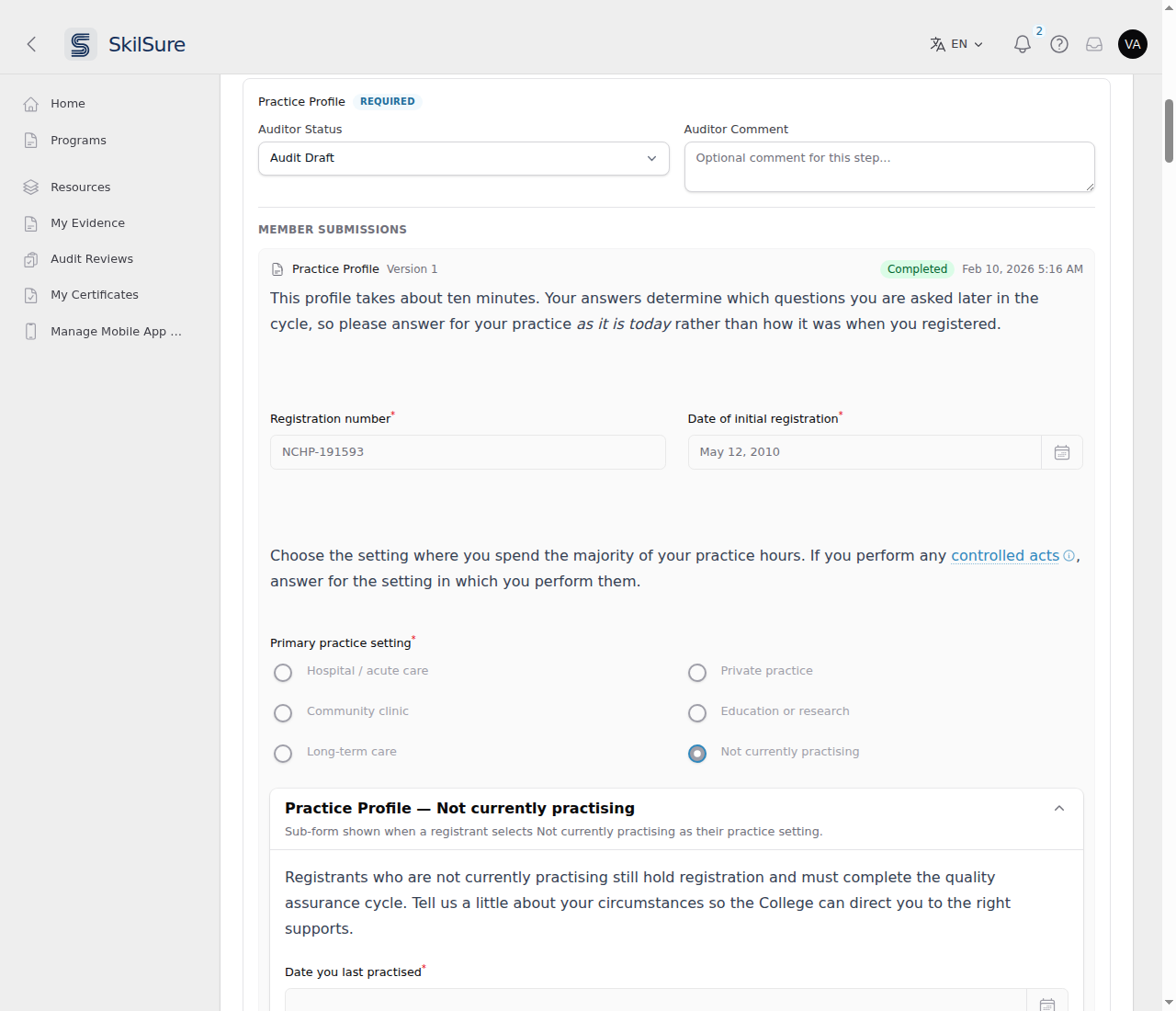 An auditor's review page. The member's Practice Profile appears as the member saw it, including the sub-form their answer opened.
Every Work Hours error message can be reworded
2026-10-09. When a member submits a form, the Work Hours field can reject a value that is fractional, negative, above its maximum, or (with a Dynamic Combined Minimum) too low in total. Those four messages used to be fixed English text. You can now reword each one in Custom Text under the Forms card, and members using French now see them in French. The default English wording is unchanged. See Custom Text.
Rating required competencies no longer redraws the audit review
2026-10-09. In an audit review's required competencies list, each rating pick and each pause while typing a comment used to redraw the whole review form, which could make the page jump or the cursor disappear mid-sentence. The list now keeps the auditor's answers on the page and sends them with Save Draft or Submit Review, so nothing redraws while they work. As before, answers are kept only once the draft is saved. See Audit reviews.
Typing in a Learning Portfolio goal is no longer interrupted
2026-10-08. While a member edits a goal, their work is saved in the background every few seconds. That save used to redraw the phase form, which could make the form jump or the cursor disappear mid-sentence. It no longer redraws anything, so members can keep typing. A choice made from a list, a date picked from the calendar, a switch, or a signature is now auto-saved too. Before, those were only saved if the member typed something afterwards. The same fix was made to the Log Activity form earlier this month. See Learning Portfolio.
Auditors and supervisors can open Competency Rating evidence
2026-10-07. Files a member uploads on a Competency Rating step now appear, each with a Download link, wherever that step is shown read-only: the auditor's review page, the supervisor's sign-off page, and View Step Content in the admin panel. Nothing is shown when auditors are set to the Redacted view. See Audit reviews.
Audit reviews show Learning Portfolio requirements
2026-10-07. On the audit review, each Learning Portfolio step now shows its Completion Requirements (goals assigned and goals completed against the number required) and any Form and Period Completion Rules, with the member's live progress, as Activities steps already did. Supervisors see the same on the sign-off page. They are hidden under the Redacted auditor profile and are not kept with a submitted review. The card's wording, including each period's date line ("P2 — 2026-02-01 to 2026-02-28"), can now be changed under Settings → Custom Text (General, Learning Portfolio and Audit cards). See Program audits.
Tell same-named courses apart in a select menu
2026-10-07. A form's Select Menu block has a new Option label setting that builds each option's label from its option list fields, for example {label} - {format} - {attendee_points} points ({key}). Courses that share a title no longer look identical, and people can search by course code. Leave it empty to keep showing the label alone. See Option lists.
Manage option list items one at a time
2026-10-06. An option list's options now sit in a table on its Edit page, with search, sort, a Live/Withdrawn filter and paging, so long lists such as a course catalogue are easy to work with. Add, edit, reorder and export options from there, edit each option's extra Fields, and Withdraw an option to stop offering it. Withdrawn options no longer appear in new form entries, while entries that already hold one keep it and reports keep its label. See Option lists.
Choose the steps auditors review
2026-10-05. An audit cycle can now limit its reviews to chosen required steps of the target program. When you create or edit an audit program's cycle, turn on Enable Audit Review Selected Target Program Steps and pick the steps. The Audit Review Required Competency section is now on the create window too. New reviews then list only those steps, for the auditor and the supervisor alike. If none of the chosen steps applies to a member, their review covers every step as before. Members still complete their whole program before submitting for review. See Program audits.
Supervisor sign-off for audit reviews
2026-10-05. An auditor's submitted review can now wait for a supervisor to approve it before the member sees the outcome. Turn it on under Settings → Audit Program → Audit Review Supervisor Sign-off, then list supervisors on each audit assignment, by user or by user group. Supervisors need the Can Sign Off Audit Reviews permission, which the built-in Supervisor role has by default. A supervisor marks each step Approve or Auditor Resubmit Required, and either approves the review or returns it to the auditor to change. Assignments with no supervisor work as before. The Audit Reviews report gains a Supervisor Name filter, supervisor columns and a Resolve Sign-off action, and the auditor's fields now read Auditor Status, Auditor Comment, Auditor Final Status and Auditor Final Comment everywhere. See Program audits and Audit reviews.
Choose the competencies auditors review
Audit cycles can now list the competencies an auditor reviews. Under the audit cycle's Audit Review Required Competency section, add rules per competency path: pick the competencies yourself, or list those the audited member rated at chosen values on their own Competency Rating. Add the new Audit Required Competencies block to the Audit Review Form to show the list. Auditors see the member's rating beside each competency, and are told if the list changes before they submit. See Program audits.
September 2026
Audit reviews show member custom fields and Activities rules
Auditors can now see more of the member's context on the review. Under Settings → Audit Program → Auditor Visibility, Display User Custom Fields in Audit Review picks which User Custom Fields appear in the Review Context (shown even under the Redacted profile). Each Activities step also shows its Completion Requirements, live while the auditor works and frozen when the review is submitted. User Custom Field labels can now be entered per language. See Program audits.
Uploading from a phone: a reminder under every upload box
Members sometimes report that uploading from a phone "only works in Edge", or that other browsers "allow only 10 uploads as a trial". SkilSure has no such limit, and uploads work in every browser. When a member taps an upload box, the phone opens its own file chooser, and a third-party file, scanner or cloud app in that list is what shows the trial.
Every upload box a member can fill in now has a one-line reminder underneath: choose the device's built-in Files, Photos or Camera option. It is not shown on read-only views. To reword or hide it, search for "On a phone or tablet" under Settings → Custom Text (Forms card). See Upload a file from a phone or tablet for what members see.
Data imports now tell you when one needs attention
The import list now has a Health column that reads the runs themselves:
- Stalled — a run stopped making progress. A sweep now marks these failed on its own within the hour, so they no longer sit as "in progress" for ever.
- Last run failed — the most recent attempt did not finish. It stays until a later run succeeds.
- Overdue — a file has been waiting more than two hours and nothing has picked it up.
A healthy configuration shows nothing in the column. Hover a badge for the detail — which run, how far it got, and when it was last alive. See Spot an import that needs attention.
More of what members read is now editable under Custom Text
Several member-facing screens still carried wording you could not change. They are now listed under Settings → Custom Text like everything else, in every language your tenant has enabled:
- the Performance Profile — its headings, the assessment and attempt labels, the standard-level wording and the diagnostic results section;
- the quiz feedback PDF — the report title, the date and name labels, the pass/fail badge, the category breakdown heading and the generated-on line;
- the attempt history result wording, and the notice shown when a quiz is slow to load;
- Activities — the response counters, the target-points line, the editing notice and the activity-selector hint;
- Competency Rating — the uploaded-file label, the preview control and the default suggested-goals heading;
- the Home page program-step statuses and the Form step's Submit button.
Search the Custom Text page for the words you can see in the app; the counts on each content-type card have gone up accordingly. See Custom Text.
Custom Text can now hide a string, not just reword it
Custom Text could change wording but never remove it. Clearing a field put the platform default back, so there was no way to say "show nothing here" — the nearest thing was replacing the text with a space.
The edit dialog now has a Hide this text toggle, one per language. Tick it and members see nothing in that spot; the row reads Hidden instead of a dash. Clearing a field still means "use the default", exactly as before, so nothing you have already set changes behaviour.
Wording that carries a value — a count, a date, a name — has no toggle, because hiding it would take the number or date with it. For anything that labels a button or heading the toggle warns you first: hiding it leaves a control with nothing written on it. See Custom Text.
The same toggle is on Custom Audit Messages under Settings → Audit Program, which edits the same wording from the other direction — so you can drop an audit stage message without leaving that page. The per-cycle Override Custom Audit Messages section does not have it: a blank box there already means "use the tenant-wide wording". See Audit Program.
A member's quiz feedback PDF is written in their language, not yours
A feedback PDF downloaded from Reporting → Quiz Analytics → Quiz Attempts now follows the member's language, the same way a certificate does. If your tenant has more than one language enabled the action asks first, defaulting to the member's own language — so you can still take a copy in your own language when you are reading it yourself. Single-language tenants see no extra step. See Quiz attempts.
A certificate's name and signer title now follow the recipient's language
The certificate's name and the Signer Title under the signature can now be set per language, like the rest of the certificate. Write them the way you write the rest: switch the admin panel to the language you want, type the wording, save. A language you leave blank falls back to one you did fill in, so a certificate is never printed with a gap where your wording should be. Clearing a Signer Title in every language is how you remove that line from the certificate.
Signer Name is deliberately unchanged — a person's name is not translated. See Certificates.
Target an announcement at a program or a single cycle
Site Settings → Announcements → Audience Targeting has a new Target Cycles box alongside Target Programs. Target Programs reaches everyone enrolled in a program whichever cycle they are in; Target Cycles narrows that to a single run of it, listed as Program - Cycle — useful for a message about one year's deadlines or requirements.
Existing announcements are unaffected: an announcement with no targeting still goes to everyone, and the other three boxes behave exactly as before. See Announcements.
Hide the "Form submitted" confirmation on a Form step
A user who finishes a Form step sees a confirmation reading Form submitted and the date they submitted, sitting between the step title and their answers. You can now turn that off per form: open the content item, go to Completion Configuration → Display Configuration, and switch off Show Form Submitted message. Every existing form keeps showing it until you say otherwise, and switching it off leaves the Edit and Delete buttons in place if you have allowed users to change their submissions. If the wording is the only problem, leave it on and reword it under Settings → Custom Text instead. See Choose what a Form step shows the user.
August 2026
Reword the "Description" heading on a Competency Rating step
The Description heading above a competency's rating can now be changed under Settings → Custom Text: choose the Competency Rating content type and search for Description, alongside the Suggested Goal and Additional Information headings that sit beside it. Blank it out if you would rather members saw the description with no label at all. It also now follows the member's language instead of always reading "Description". See Reword text with Custom Text.
See how people answered a form, field by field
Reporting now has a Forms Analytics dashboard, sitting just under Activities Analytics. Pick any form — including the goal-phase forms inside a Learning Portfolio and the forms behind Activities — and it shows how many people answered each field and what they chose: counts and percentages for option lists, averages and medians for hours, date ranges with a month-by-month count, and attachment rates for file uploads. Work-hours figures read as 4h 1m rather than 4.02. Export CSV gives you the same figures for a spreadsheet. Only submitted work is counted, so drafts and superseded attempts don't inflate the numbers. Fields pulled in from a linked sub-form are counted alongside the form's own, and translated field labels appear in your admin language. Where several prompts share one stored answer, you get a single card naming all of them instead of the same numbers repeated. See Reporting & analytics → Forms Analytics.
Reword the text on a Form step
The wording members see on a Form step can now be changed under Settings → Custom Text — the criteria heading, the submission counters, the "not published yet" notice, and the Submit button itself. Filter the "Shown on" column by Form content to see them together. These were previously fixed English, so they also stayed English for members reading in French; they now follow the member's language. See Reword text with Custom Text.
Checkboxes and radio buttons on a form are easier to see
The option circles and boxes on a form's Checkbox List, Radio List and Scale fields were drawn small, with a very faint outline — hard to see on a long form, and not matching the ones on a Competency Rating step. They are now slightly larger, sit with a little more space around them, and use the same clearer outline as Competency Rating, so the two kinds of step look consistent. Nothing about how the fields behave has changed.
Choose whether a certificate needs all its requirements, or any one of them
A certificate's Requirements section gained a Requirements Mode selector. All — the existing behaviour, and still the default — means the user must meet every requirement listed. Any means meeting a single one is enough, which suits a certificate that can be earned by more than one route. Switching an existing certificate to Any also re-checks users who already qualify, so they receive it without waiting to finish something else.
Show a user's member number and their completed steps on a certificate
A certificate's Data Fields section gained a User Member Number field, so a user's member number can be printed alongside their name. And the new Display Program Steps Completion section can add a "Completed Step(s)" table to the bottom of the certificate, listing each program step and the date the user completed it. Choose which steps appear with Steps Display Mode: Required Steps Only, Optional Steps Only, or Both Required and Optional Steps. A step the user hasn't finished yet still gets a row, with the date left blank.
Let members pick more than one rating per competency
A Competency Rating step can now offer checkboxes instead of radio buttons. On each rating scale row there are two new settings — Rating Scale Mode for the individual competencies and Group Rating Scale Mode for the group as a whole — each set to Single-select or Multiple-select. Single-select is the default and is exactly what the step did before, so nothing changes until you switch one. Switching is also safe in both directions: a member who picked several ratings and then sees the step set back to Single-select keeps their answers, and switching forward again brings the rest back. See Competency Rating steps.
A Save button on Competency Rating steps
Ratings have always saved as the member makes them, which left some members unsure whether their work was safely stored. There is now a Save button at the foot of the rating form, and a group's button shows a green check once every competency in it is rated. The REQUIRED and OPTIONAL headings above the group buttons are also easier to read — the optional group's button no longer looks disabled. See Complete a step.
Guidance on a competency group
A competency group can now carry Additional Information — a block of rich text that members see as an expandable panel under the group heading, useful for a standard's full wording or links to source material. It shows whether or not the group itself is rated. Collapsible definitions also now work on every rich-text field on a competency path, so you can tuck an explanation behind a term anywhere in a competency's name, description or guidance. See Competency groups.
Tie two date fields together on a form
A form that asks for two related dates — a start and an end, a course date and a completion date — can now enforce the order between them. On a Date Picker block, turn on Multiple Datepicker Relationship Rule, choose a rule (before, on or before, the same as, on or after, after) and the other Date Picker it applies to. Set it once, on either field: the rule works both ways, so the member's calendar greys out any day that would put the pair in the wrong order, whichever field they fill first. It only ever narrows what can be picked — a field's own minimum/maximum, its member cycle or portfolio period dates, and the current-date limits all still apply. Works on activity forms, learning-portfolio phase forms and standalone forms. The message shown when a pair breaks the rule can be reworded per language under Settings → Custom Text → Forms. See Relating two date pickers and the user-side When two dates belong together.
Progress stats on the member's step card
You can now show a step's completion requirements, with progress bars, on the member's Program Steps dashboard card — so a user sees "1 / 2 learning records" or "4h 0m / 15h 0m" without opening the step. Turn it on per step under Step tab → Progress Step Dashboard, pick which requirements appear, and — for requirements where it makes a difference — choose whether counts include saved work or only submitted work. Learning Portfolio, Activities, Category Activities, Competency Rating, Form and Quiz steps each offer their own requirements. Requirements you still owe are listed first, and a card shows at most four rows plus a "+N more" line. A requirement you've hidden from the member inside the step is never offered here. See Progress Step Dashboard.
Hide a step's description from its dashboard card
The same section has a Show step description in user view Program Steps' step card switch, on by default. Turn it off to keep a long description off the card without removing it — it still shows on the step itself. It works independently of the progress stats switch, so you can use it on any step. See Progress Step Dashboard.
Make users declare an Activities step finished
Activities steps have always completed themselves the moment the requirements were met. A new Auto-complete switch (Completion & Review → Submission Requirements, on by default) lets you turn that off, so the step waits for the user to press Submit. The button only appears once the requirements and any Form Completion Rules are satisfied, and submitting locks the step against further changes. Submitted too early? Mark In Progress on the step reopens it and returns their activities to draft. Turning the switch off never undoes work users have already finished — anyone whose step was complete stays complete. See Require a manual Submit.
Users' work saves itself
On the Activity and Learning Portfolio steps, what a user types is now saved as a draft a moment after they stop typing — an Auto-saved note appears next to the buttons. A closed tab, a dropped connection or an expired session no longer costs them their work. Auto-saving only ever saves a draft: it never submits on the user's behalf and never touches an entry they have already submitted, so they still press Submit when they're finished. See Activities and Learning Portfolio.
Failed submits jump to the problem
If a user submits an activity with something missing, the form now scrolls straight to the first field that needs attention instead of leaving the message somewhere off-screen.
More member text you can reword
The Activity and Learning Portfolio user views are now covered by Custom Text, so you can reword them per tenant and they appear in French for French-language members. That includes the status labels (activity statuses under Activity statuses, goal statuses under Goal statuses), buttons, empty states, field labels and every on-screen message on those steps.
Goals you haven't named yet
A goal created before it has been named now shows as Untitled goal rather than carrying the prompt text as its name — so it no longer looks like a real goal name in tables, reports and exports. The stand-in is translated and rewordable through Custom Text.
Duplicate a program definition
You can copy an entire structure — every path, step, order and schedule, content attachment, role assignment, prerequisite and mentorship setting — in one step, and rename the copy as you make it. Use it to build next year's structure without touching the definition your current cohort is enrolled under. Duplicate from a cycle (the copy is selected for that cycle) or from the new Program Definitions tab (the copy is just created, unattached). Content items stay shared between the original and the copy, so editing content still affects both — the one exception is a step that lets users choose a path, which gets its own copy pointing at the new structure's paths. See Definitions, paths & steps.
See and manage every definition
A Program Definitions tab on the program edit page lists every definition in your organisation, showing which programs and cycles use each one and how many users are enrolled through it, alongside its path and step counts. Search it, choose your columns, and rename, edit, duplicate or delete a definition from its row. See See and manage every definition.
Deleting a definition is now reversible
Deleting a definition used to remove it along with its paths and steps, and blank it out on any cycle still pointing at it. It now hides the definition instead: its paths, steps and content are untouched, anyone already enrolled carries on exactly as before, and a Deleted filter lets you bring it back. Delete is only offered when nothing is using the definition, and it's limited to the Super Admin and Admin roles.
June 2026
Custom columns across Activities and Goals
You can now add custom columns to the Activities table and the Learning Portfolio Goals table to surface the fields your team tracks — in both the admin analytics views and the user-facing views. Configure them under Settings → Activities and on the Goals table.
Activity completion rules
Form completion rules let you define when an activity counts as complete based on the responses submitted, with a user-facing dashboard showing progress against those rules.
Cross-step activity selector
A new content type lets a step pull together activities from across a learning portfolio or CE activities, so users can review and select from their prior work in one place.
Video content type
Admins can add video content: upload a file, and users get an in-app player with completion tracking. The editor shows media details (duration, resolution, size, thumbnail) and supports drag-and-drop, replace, and cancel.
French (Canadian) experience
The user-facing app and forms can now be presented in Canadian French, with a data-driven locale switcher and per-tenant translation overlays. Admins can generate and edit French translations of V2 forms from a Translate action.
Refreshed in-app help
The page-level help button now opens documentation served from this docs site, keeping help content and these public docs in sync.
Multi-locale completion-rule titles, timezone-correct admin dates
Completion-rule titles and labels can be set per language, and Goals and Completed Program dates now display and export in your tenant's timezone.
May 2026
Cycle reporting & completed-program exports
A new reporting engine produces per-cycle Completed Program exports — bundling quizzes, forms, learning-portfolio goals, certificates, evaluations, and resource checklists into PDFs and CSVs, with selection criteria and export status tracking. See Cycle reports and Reporting & analytics.
Data imports
Bulk-import users and reference data from CSV. See Data imports.
Programs submenu & in-program cycle switcher
The app gained a Programs submenu and an in-program cycle switcher, so users can move between programs and cycles without leaving the page. Steps can also be shared and inherited across programs.
Certificates API
A certificates API supports issuing, listing, updating, and revoking certificates programmatically.
April 2026
Learning Portfolio
The Learning Portfolio matured substantially: assigned-goal dashboard cards with progress, an inline goal drawer with slide-over phase forms, user-defined goals, goal phase-form configuration, and completion rules that gate step completion based on submitted responses.
More single sign-on options
Added SAML 2.0, OpenID Connect, OAuth 2.0, and generic HMAC-URL single sign-on providers, configurable per tenant.
Program builder improvements
The Program Definition Builder gained competency-rating step selectors and cascading suggested-goal configuration, plus simpler step/content setup.
March 2026
Goals from competency ratings
Goals can be auto-generated from competency ratings across multiple paths, with a redesigned goal-creation experience and inline phase transitions.
February 2026
CE Activities foundation
The Continuing Education activities module was established, providing the basis for activity tracking, submission, and the completion-rule and reporting work that followed.
Question and quiz tooling
Question pools gained bulk actions (e.g. setting the required flag), question import added a downloadable CSV template with examples and an in-app import guide, and analytics views gained loading indicators and lazy-loaded answer distributions.
January 2026
Feature flags and analytics polish
Feature flags can be applied to admin resources to gate functionality per tenant, and reporting/analytics screens were refined.
Late 2025
Platform foundation
SkilSure 2.0 launched its core: multi-tenant portals, programs and cycles, competencies and scales, content and quizzes, resources, and user management — the foundation everything above builds on.